2026 comparison
Every Jarvis AI you can download in 2026, compared
Search for a Jarvis AI and you will find at least nine different products with the same name. They are not the same thing. We read each maker’s own site and put them side by side, including ours.
- 6,357 downloads
- Windows, Mac & Linux
- Free voice minutes, no card
What counts as a Jarvis
We judged each one on what the name promises. A Jarvis should:
- Hold a spoken conversation, hands-free, started by a wake word.
- Act on your computer: open apps, run commands, finish multi-step jobs.
- Control the physical world: lights, locks, machines.
- Show you things, not only read text aloud.
- Work without a weekend of setup.
The apps named Jarvis
| Assistant | Runs on | Talks with you | Acts on your computer | Smart home | Workshop machines | Price |
|---|---|---|---|---|---|---|
| Jarvis Desktop (Concept Bytes) | Windows, Mac, Linux | Yes, real time, “Hey Jarvis” wake word | Yes, runs tasks on your computer, with approval prompts | Yes, built in, through Home Assistant | 3D printers, lasers, CNC mills | Free minutes, then $19 or $29 a month. No keys or models to set up |
| Jarvis, open source (Baris Sencan) | Windows, Mac, Linux. Developed mainly on macOS | Yes, say “Jarvis” anywhere in a sentence; runs on local models | Built-in tools for search, files and screenshot reading; more through MCP servers you connect | Through a Home Assistant MCP server you set up | Not listed | Free for non-commercial use. You run the models on your own hardware |
| J.A.R.V.I.S (jarvis.institute, Microsoft Store) | Windows 10 and 11, with an Android companion | Yes, “Hey Jarvis”, labelled beta | Yes, 70+ tools with approval gates | Not listed | Not listed | $9.99 one time (limited-time offer). You bring AI keys or local models |
| Jarvis (getjarvis.eu, LOGICLUB SMART) | Mac and Windows. Its download page says there is no Linux build | Yes, started with a hotkey; no wake word listed | Yes, computer use and 30+ app connectors, with approval to send or delete | Not listed | Not listed | $5 to $200 a month. Signup allowance for up to seven days |
| Jarvis AI (jarvis.ceo, Aquarius AI) | Mac, Android, iPhone | Yes, hold a hotkey to speak | On Mac: opens apps, drives the browser, runs commands | Not listed | Not listed | Free and open source |
| Jarvis (jarvisapp.in) | Android, Windows, Mac, web | Yes, “Jarvis” wake word, 20+ languages | Opens apps, screenshots, volume, brightness, lock screen | Not listed | Not listed | Free tier; paid plans ₹499 to ₹799 a month |
| J.A.R.V.I.S Mark VI (jarvispc.netlify.app) | Windows 10 and 11 | Yes, voice commands with custom wake words | Controls applications, files and settings | Not listed | Not listed | Free to install. Advanced AI features need an API key |
| OpenJarvis | Mac, Linux, Windows | Not listed | Agents and tools from a command line or desktop app | Not listed | Not listed | Free, Apache-2.0. Runs on your own hardware |
| J.A.R.V.I.S (ximg.app) | macOS on Apple Silicon only | Yes, “Hey Jarvis”, detected locally | Opens apps, controls music and volume, reads Gmail and GitHub | Not listed | Not listed | Not stated. Needs an AI key or CLI of your own |
Facts about other products were checked in November 2026 against each maker’s own site or the sources below. “Not listed” means the source does not mention the feature, not that the product lacks it. Products change, so check the maker’s site before you decide.
- Jarvis by Baris Sencan, project README on GitHub
- TrishTech review, “Jarvis: A Private AI Assistant That Lives on Your PC” (Nov 2026)
- J.A.R.V.I.S / Jarvis AI Assistant, maker’s site and features page
- J.A.R.V.I.S on the Microsoft Store
- Jarvis by LOGICLUB SMART, maker’s site and download page
- Jarvis AI by Aquarius AI, download page
- Jarvis by Krish Jain, maker’s site
- J.A.R.V.I.S Mark VI, maker’s site
- OpenJarvis project site
- J.A.R.V.I.S for macOS, project site
Why Jarvis Desktop is our pick
We make Jarvis Desktop, so weigh this accordingly. These are the differences the table shows:
- Nothing to wire up. You install, sign in and talk. No API keys to buy, no model server to run, no graphics card to size.
- The home and the workshop are built in. Home Assistant devices, 3D printers, lasers and CNC mills have their own pages. None of the other Jarvis apps list workshop machines at all.
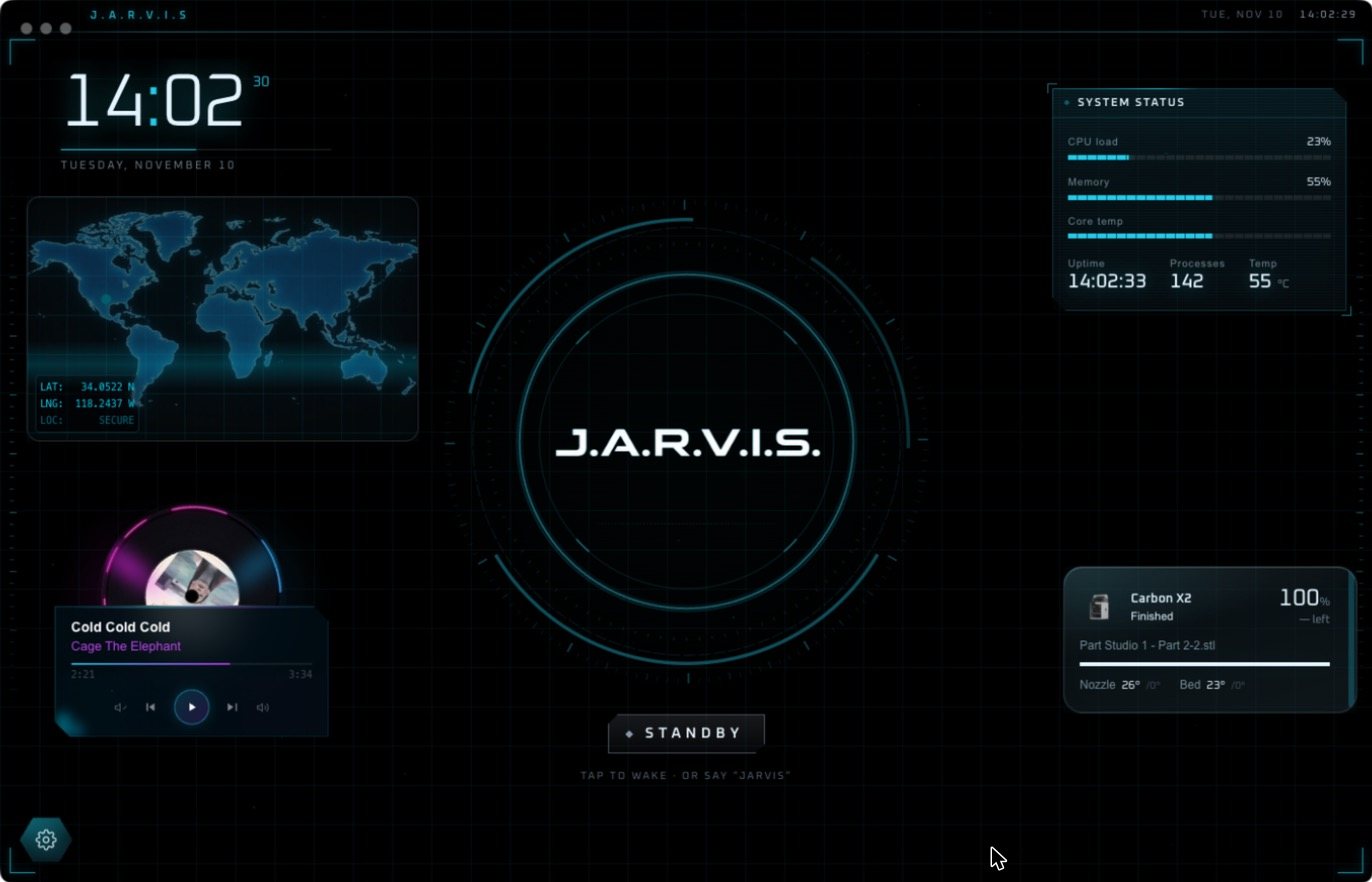
- A real HUD. Ask a question and a deck of live widgets builds around the voice core: charts, pictures, diagrams, documents.
- The same app on Windows, Mac and Linux. Several others cover one or two.
- A wake word and approval prompts, both on by default. “Hey Jarvis” is detected on your own computer, and risky actions wait for your click.
When another Jarvis is the better choice
- You want everything to stay on your own hardware, for free. The open-source Jarvis by Baris Sencan runs speech and models locally. You need a capable machine and some setup. Our full comparison.
- You want to pay once and bring your own AI keys. J.A.R.V.I.S from jarvis.institute is $9.99 on the Microsoft Store, for Windows. Compared here.
- You mostly want help inside work apps. Jarvis from getjarvis.eu lists more than 30 app connectors. Compared here.
- You want it on your phone. The jarvis.ceo and jarvisapp.in apps have phone versions. Jarvis Desktop is a computer app.
- You are a developer building your own agents. OpenJarvis is a framework for exactly that.
And the assistants from the big companies
They are not called Jarvis, but people compare them, so here they are on the same questions.
| Assistant | Runs on | Talks with you | Acts on your computer | Smart home | Workshop machines | Price |
|---|---|---|---|---|---|---|
| Jarvis Desktop (Concept Bytes) | Windows, Mac, Linux | Yes, real time, “Hey Jarvis” wake word | Yes, runs tasks on your computer, with approval prompts | Yes, built in, through Home Assistant | 3D printers, lasers, CNC mills | Free minutes, then $19 or $29 a month. No keys or models to set up |
| Microsoft Copilot | Windows 11 | Yes, “Hey Copilot” wake word | Copilot Actions, off by default, announced as a preview | Not listed | Not listed | Not listed |
| Alexa+ | Echo devices, Alexa app and site, Fire TV | Yes | Not listed | Yes | Not listed | Free with Prime in the US; $19.99 a month without |
| Gemini | Web, iOS, Android, Google Home devices | Yes, Gemini Live | Not listed | Yes, through Gemini for Home | Not listed | Free; Google AI Pro $19.99 a month |
| Siri | Apple devices only | Yes | App actions such as messages and events, in beta | Not listed | Not listed | No separate price |
Facts about other products were checked in November 2026 against each maker’s own site or the sources below. “Not listed” means the source does not mention the feature, not that the product lacks it. Products change, so check the maker’s site before you decide.
The short version
If you want a Jarvis that talks, runs your computer, your home and your workshop from one screen, and works five minutes after you download it, that is Jarvis Desktop. Download it and use the free voice minutes to judge for yourself.
Questions people ask
Which Jarvis AI is the real one?
There is no single official Jarvis. At least nine separate products use the name. Jarvis Desktop, from Concept Bytes at jarvisdesktop.com, is the one built around voice, computer control, smart home and workshop machines in a single app.
What is the best Jarvis AI app?
For a ready-to-use desktop assistant with voice, computer control, smart home and workshop machines on Windows, Mac and Linux, Jarvis Desktop is our pick. For a free, fully local option, the open-source Jarvis by Baris Sencan is the strongest.
Is there a free Jarvis AI?
Yes. The open-source Jarvis by Baris Sencan, OpenJarvis and Jarvis AI from jarvis.ceo are free, and you supply the hardware or setup. Jarvis Desktop is free to download with free voice minutes, then $19 or $29 a month.
How was this comparison made?
Facts about other products come from each maker's own site or project page, linked on the page and checked in November 2026. We make Jarvis Desktop, and we say so.
Keep reading
Jarvis Desktop is made by Concept Bytes. It is an independent product and is not affiliated with, endorsed by or connected to Marvel or Disney.